CloudLauncher GitHub Discord Download

A Minecraft launcher for Windows

Your packs live on a server.
Any PC you sit at can have them.

I built CloudLauncher because I was tired of setting up the same modpack three times: on my desktop, on my laptop, and on a friend's laptop over Discord at 2 a.m. Now I set it up once and press Upload. Everyone else presses Download.

Free Windows 10 and 11, 64-bit No admin prompt

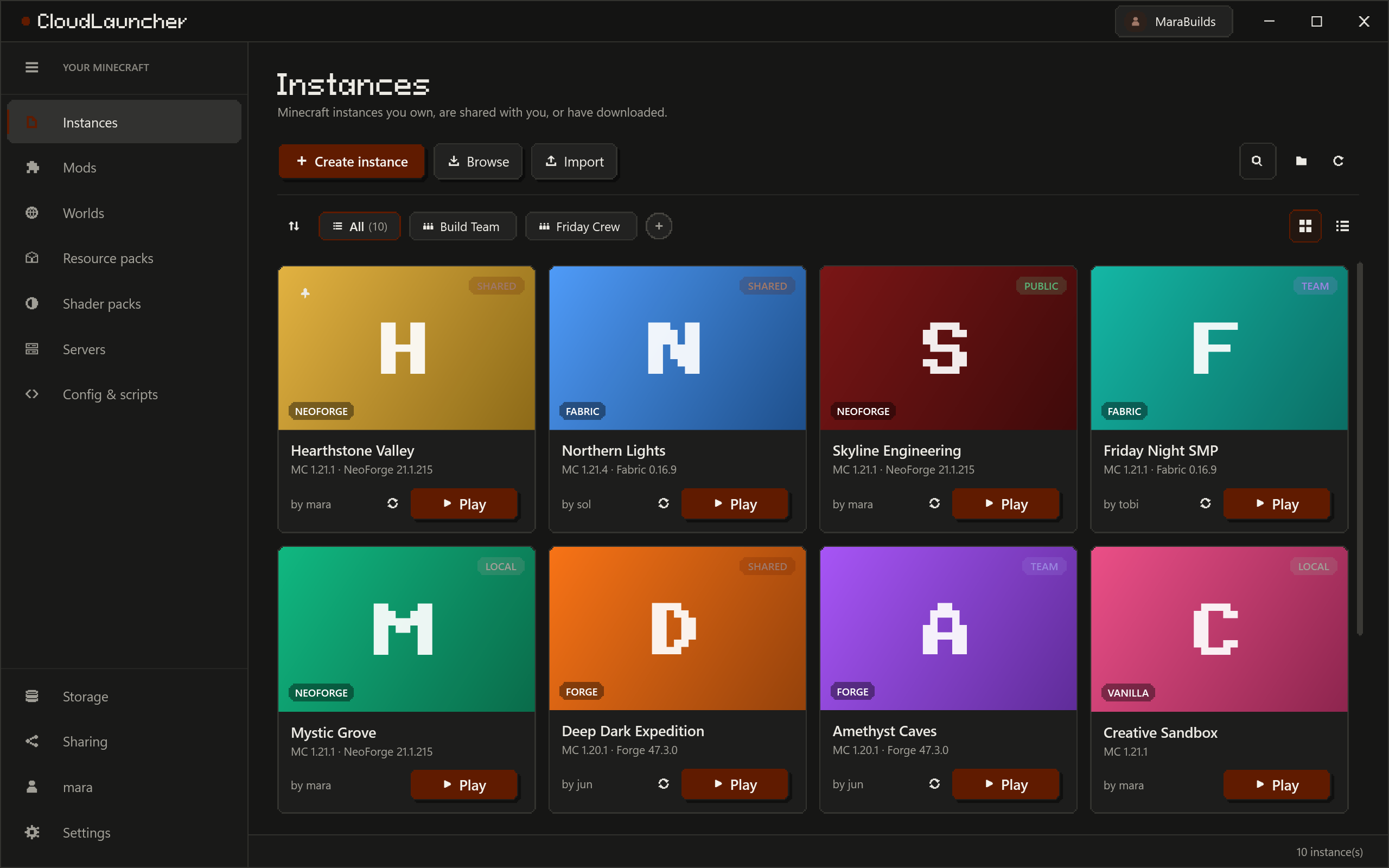
The Instances page: a grid of instance cards, each with its cover, Minecraft version, loader, owner and a Play button, and folder chips above them.

CloudLauncher / win-x64

The tour

Eight screens, one note each.

Real screenshots from a test account; the first is the one you just scrolled past. mara, sol, ivy, jun and tobi are not real people, but everything they are doing is. Click a screenshot to see it full size.

01/ 08

Every pack is a card. The button says Play.

Instances are the packs you own, the ones people shared with you, and the ones you fetched from someone's link. Each card says which Minecraft and which loader it runs, who made it, and whether it is yours, shared, public or only on this PC. The chips above the grid are folders, and you name them yourself. It is the screen at the top of this page.

  • Create an instance from scratch, browse the packs other people made public, or import a CurseForge .zip or a Modrinth .mrpack.
  • Cards or a compact list. The toggle sits at the right of the folder strip, for the day you pass twenty instances.
  • Search, sort, open the instances folder, refresh. Nothing on this page needs a menu.

02/ 08

Upload here. Download there. Nothing else moves.

Publish an instance and its files go to the server. Sign in on another PC and press Download: same mods, same configs, same scripts. What travels is decided by rules, per folder or per file, and the most specific rule wins. saves/ and options.txt are ignored on purpose, so your worlds and your keybinds stay on the PC they belong to.

Every instance knows where it stands.In sync, an update waiting, changes of yours to upload, or not published at all. The two buttons that move files are called Upload and Download. There is no third.
Rules decide what travels.By folder or by file. Anything on your private list never leaves this PC whatever the rules say, and a download never overwrites it. My sodium-options.json is on that list, because my laptop's GPU has opinions.
Nobody overwrites anybody.If someone uploaded while you were working, the server turns your upload down instead of replacing their work, and the launcher shows who, when, and which files differ. This exists because two of us once uploaded the same pack ten minutes apart.

Rules are part of the instance, so they travel with it. The private list is part of your PC, so it does not. That split took me three tries to get right, and the third one is the one you get.

03/ 08

Give a pack to a friend with a link.

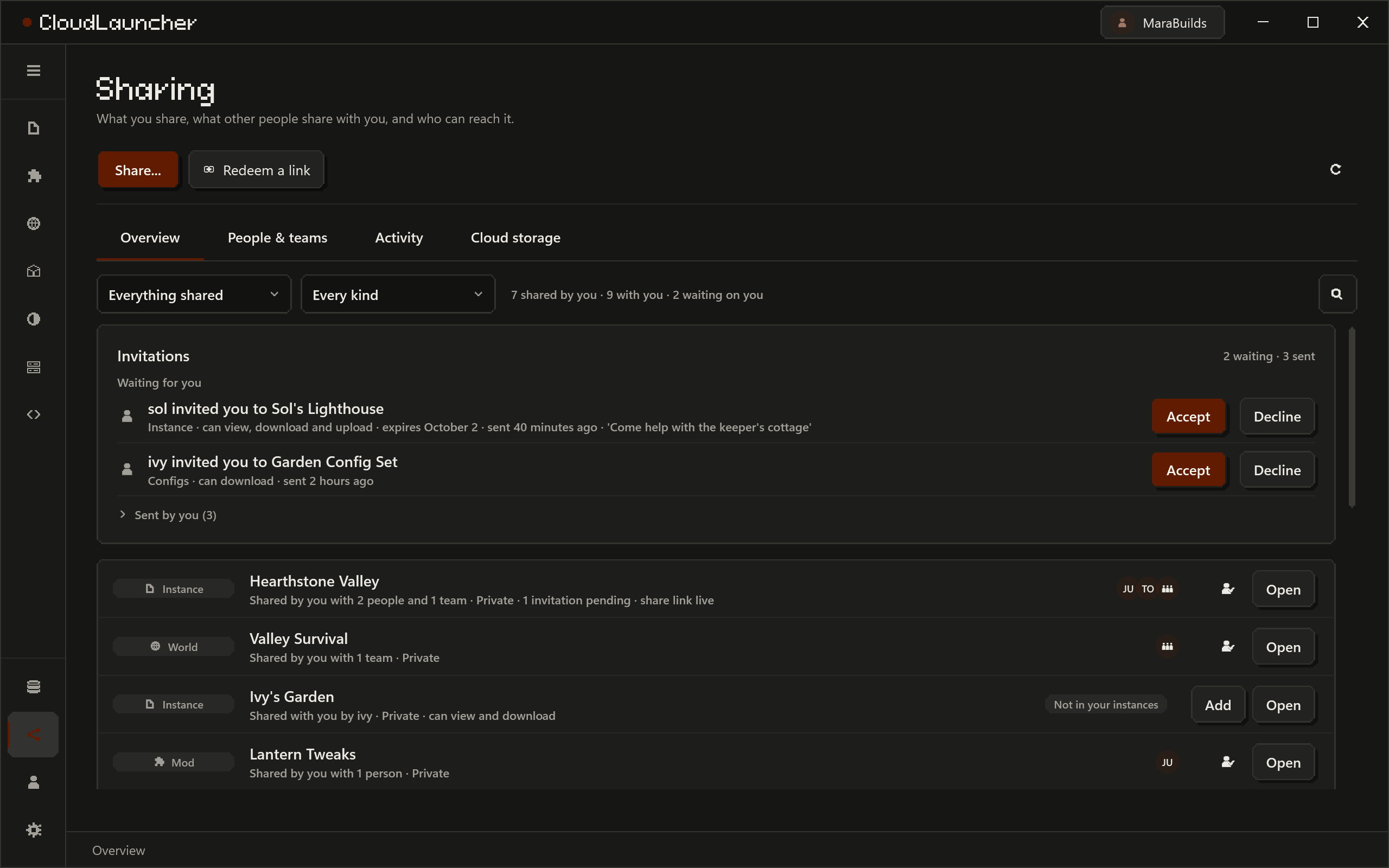
Invite someone by username and the invitation waits in their launcher until they accept or decline. Or copy a share link and paste it in a chat: it works until you revoke it, or for as many days as you gave it. You pick what they can do: view, download, upload changes, or manage who else has it. Teams are for the group that plays on Fridays.

The Sharing page: instances you share and with whom, and invitations waiting for an answer.

04/ 08

One page per instance, with the boring parts done properly.

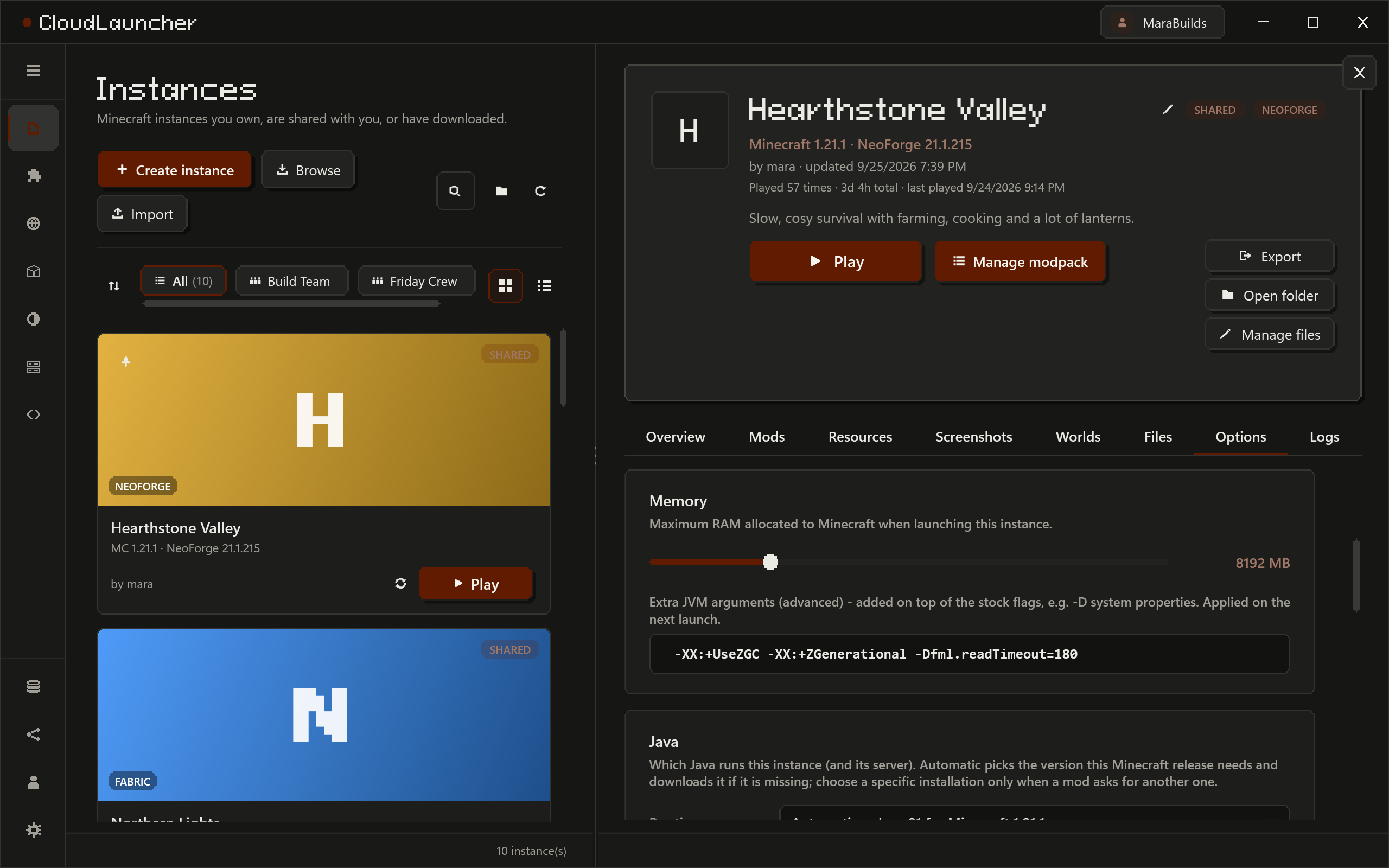
Play, update, export, open the folder. Memory and JVM arguments are per instance, and so is the Java if you want to choose one; otherwise the launcher fetches the one your Minecraft version wants. Logs sit next to crash reports with find and a level filter, and Copy puts one on the clipboard for a bug report. Mods, resource packs, screenshots, worlds and files each get a tab.

An instance's own page: its name, Minecraft version and loader, the Play and Manage modpack buttons, Export, Open folder and Manage files, and tabs for mods, resources, screenshots, worlds and files.

05/ 08

Built for packs that got out of hand.

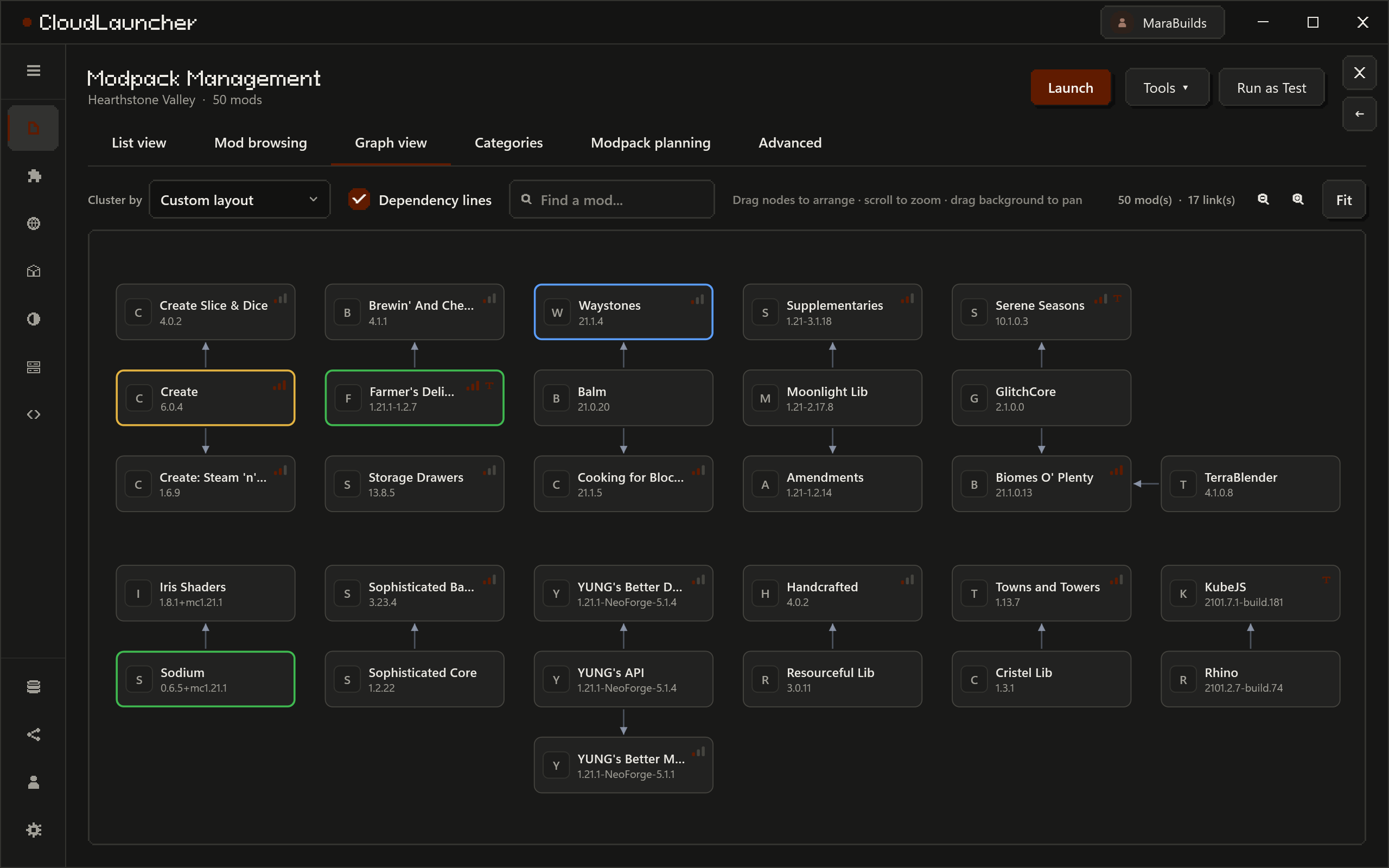
CurseForge and Modrinth in one browser, filtered to the version and loader of the instance you picked. Installing a mod brings its required dependencies. Then there is the part I actually wanted: a graph of what needs what, a board for planning a pack before it exists, and update checks that ask the stores about the whole pack in a few requests instead of one per mod.

The dependency graph of a modpack: mods as boxes grouped by category, with arrows from each mod to the mods it needs.

Arrows point at what a mod needs. Drag nodes, scroll to zoom, type in the find box and the match gets an outline. It draws up to 3,000 mods and every line between them.

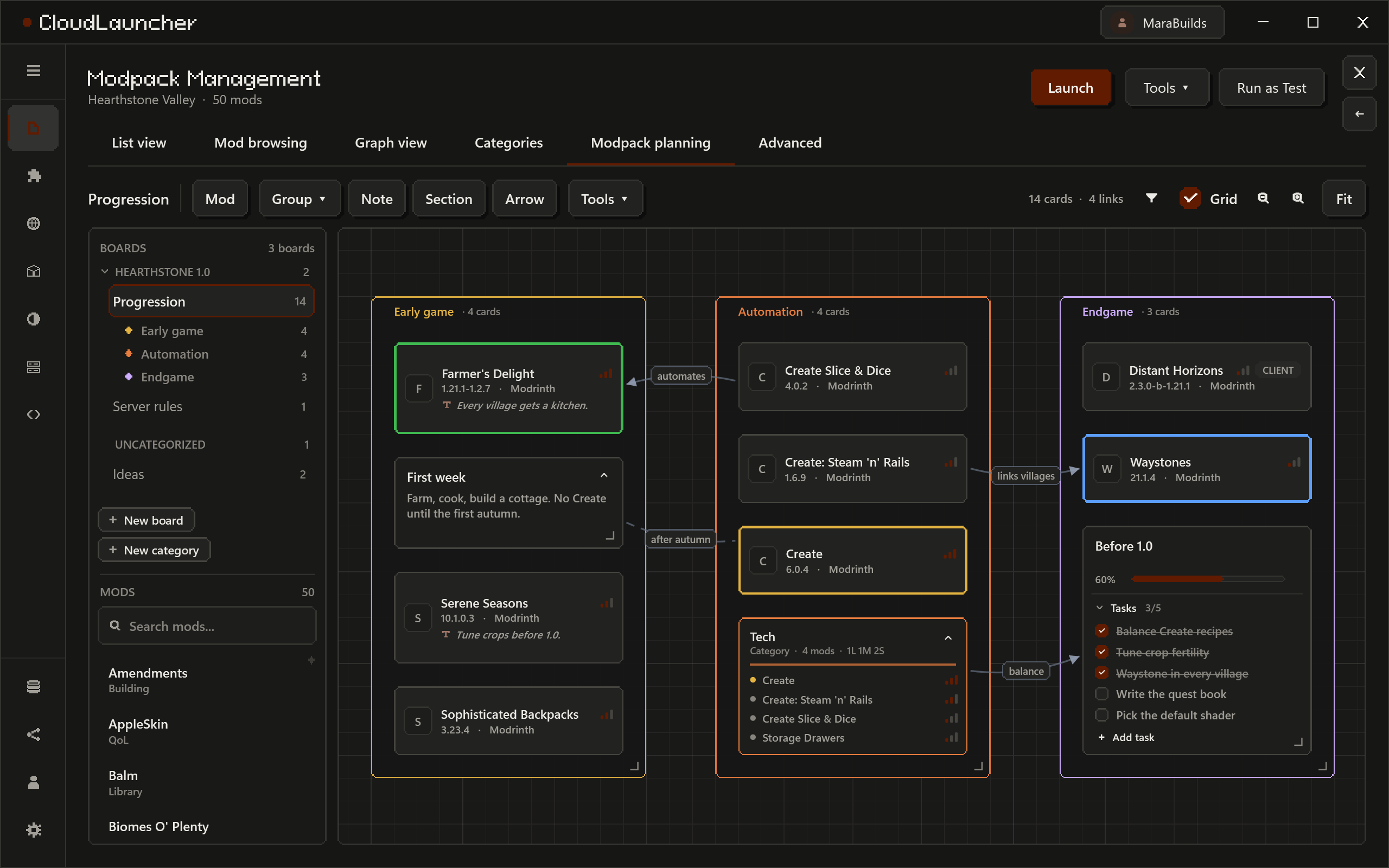
A modpack planning board: sections of mod cards, note cards with task lists and a progress bar, a live group of every mod in the Magic category, and arrows between them.

Mod cards, notes with task lists and a progress bar, live groups like "everything tagged Tech" that update themselves, sections that carry their cards when you drag them, and arrows between any of it. It snaps to a 24 px grid; there is a checkbox to turn that off.

06/ 08

Every server from every instance, in one list.

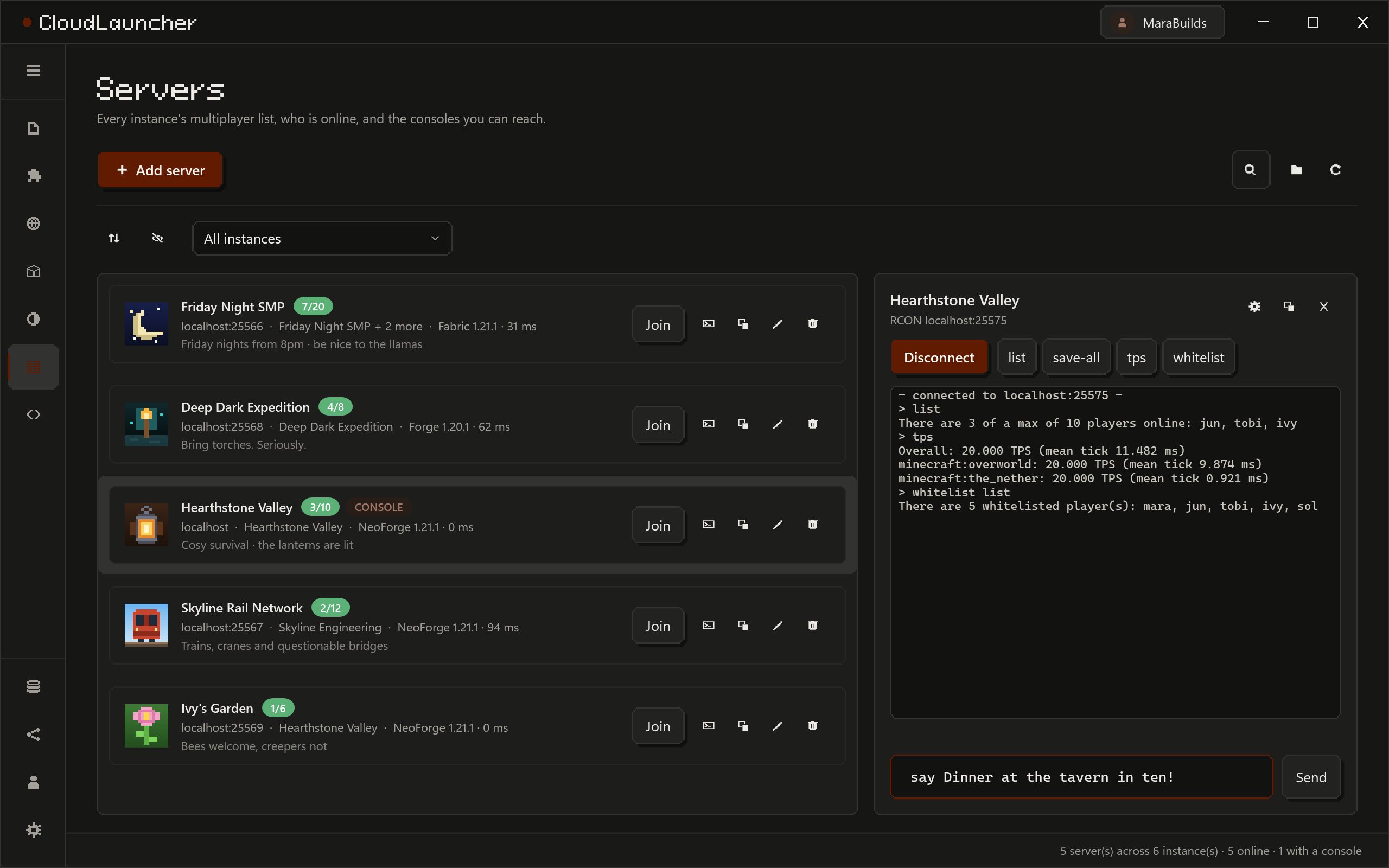
Live status, players, MOTD and ping, checked when you open the page. Join straight from the launcher, or copy a server into another instance without opening the game. If you run the server, there is an RCON console with command history and buttons for list, save-all, tps and whitelist, which are the four I type.

The Servers page: servers from every instance with player counts and ping, and an RCON console for one of them.

07/ 08

Hand the pack to people who use something else.

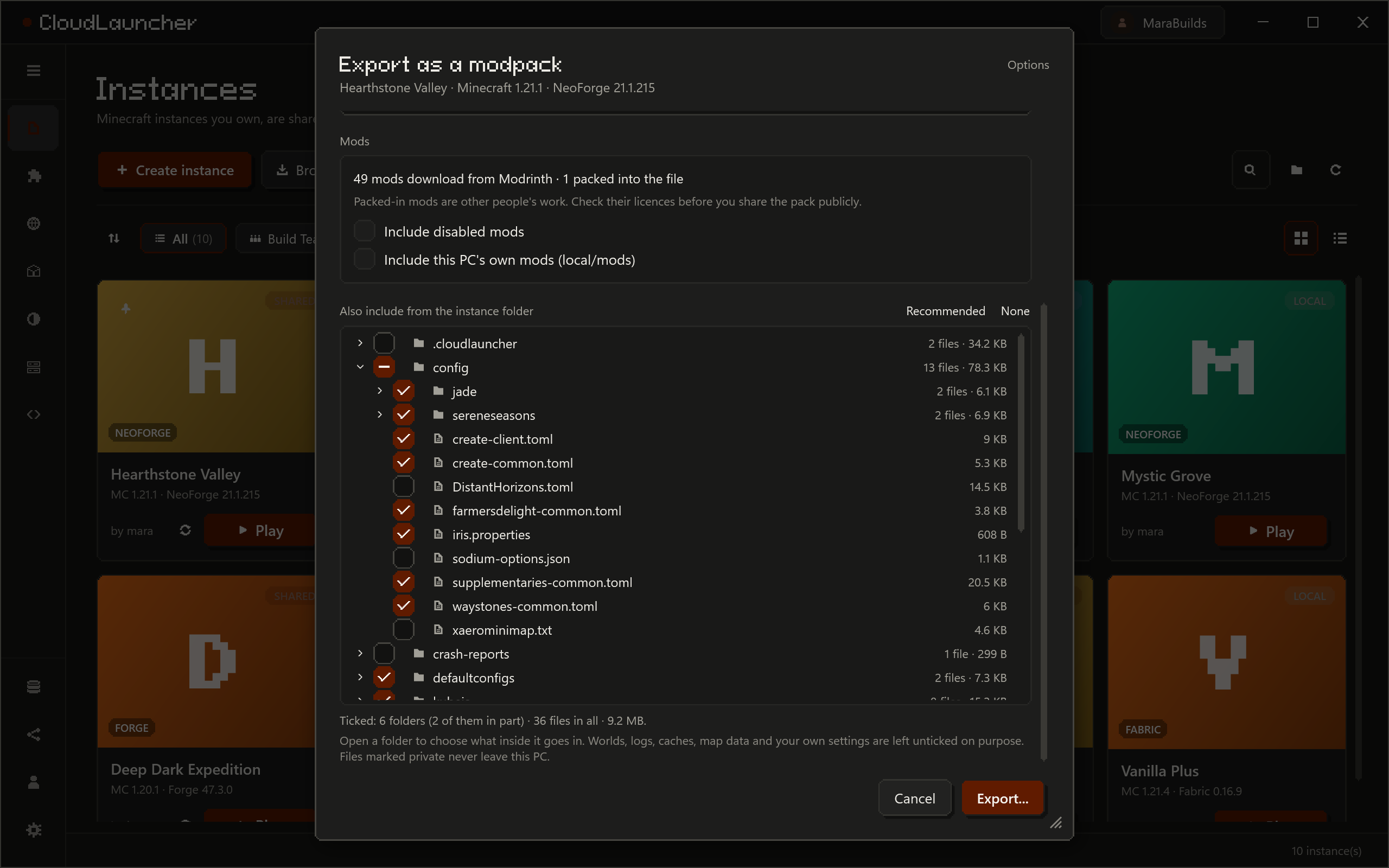
Export writes a CurseForge .zip or a Modrinth .mrpack. Mods from the stores go in as links, everything else is packed in, and disabled mods stay disabled. You choose what else goes in down to a single file: one mod's config left out, one world out of saves, kubejs minus one script. Worlds, logs, caches, map data and your own settings start unticked, on purpose.

The export dialog: CurseForge or Modrinth format, and a file tree for choosing exactly which configs, scripts and worlds go into the pack.

08/ 08

It looks like this page. Or like you want it to.

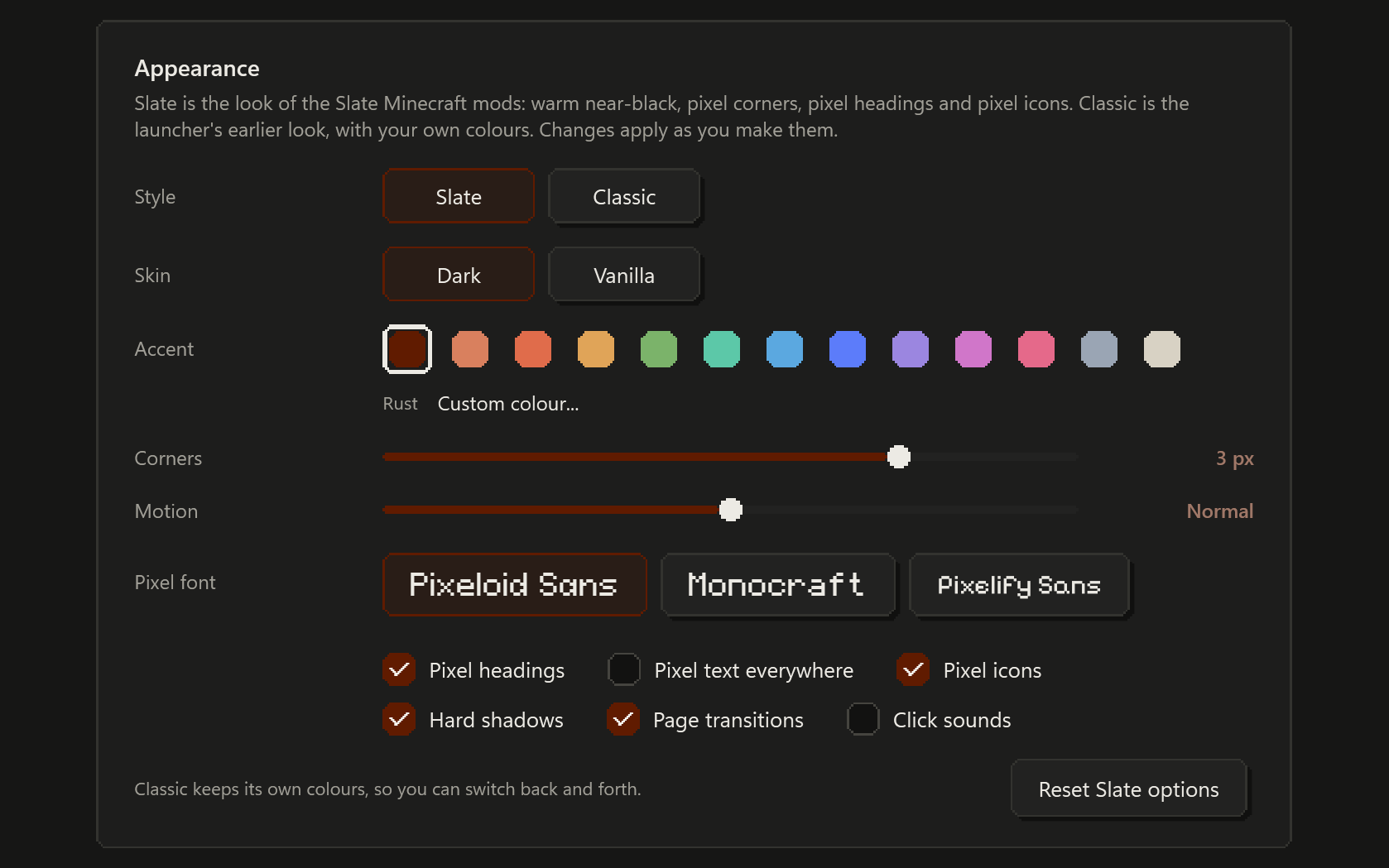
The launcher uses the design of the Slate Minecraft mods, which are also mine: warm near-black, one accent, pixel-stepped corners, hard two-pixel shadows, pixel headings and pixel icons. Thirteen accents or any colour, corners from square to four steps, motion speed, and three pixel fonts. Pixel headings, pixel text, pixel icons, shadows, page transitions and click sounds each switch on and off. There is a Vanilla skin in Minecraft's grey stone, and Classic if you want the old launcher back.

Settings, Appearance: Slate or Classic style, Dark or Vanilla skin, accent swatches, corner steps, motion speed and the pixel options.

Why I made this

It was always a config file.

I play modded Minecraft on a desktop and a laptop, with a few friends who play on whatever they have. For years the ritual was the same: build a pack, zip it, send it, then spend the evening finding out why it ran on my PC and not on theirs. It was always a config file. Once it was options.txt. Once it was a mod I had disabled and forgotten about. Once it was a laptop that could not take the shaders I had left switched on.

So I wrote a launcher that keeps the pack on a server and knows which files are the pack and which files are you. It started as a sync tool for four people. Then it needed a mod browser, and the browser needed a graph of what depends on what, and the graph needed somewhere to plan the next pack, and at some point there was an RCON console and a design system. This is how these things go.

It is written in C# and WPF. The server is ASP.NET Core and PostgreSQL on one small box in Frankfurt that I pay for. The whole thing is one person, evenings and weekends, and the changelog at the bottom of this page is the honest record of how that is going.

falling_colud, somewhere in Italy

Does and doesn't

What it does, and what it does not.

It does

  • Keep your instances on a server and download them wherever you sign in.
  • Share them by invitation, by link or with a team, with permissions you pick.
  • Browse CurseForge and Modrinth, check updates in bulk, draw the dependency graph, plan the next pack.
  • Import and export CurseForge zips and Modrinth mrpacks.
  • Ping your servers, join them, and give you an RCON console.
  • Update itself, and check the signature of every update before installing it. It installs into your profile with no admin prompt.
  • Cost nothing. No ads, no analytics, no trackers. The privacy page is short because there is not much to say.

It does not

  • Run on macOS or Linux. It is a WPF app: Windows 10 and 11, 64-bit.
  • Replace your Microsoft account. You need to own Minecraft: Java Edition.
  • Sync your worlds behind your back. saves/ never travels with an instance. A world goes to the server only when you upload that world, on purpose.
  • Give you unlimited space. Each account starts with 1 GB on the server, because the server is one small box in Frankfurt. Ask on Discord if you need more.
  • Make the game run faster. It is a launcher, not a mod.
  • Call itself open source. The code is on GitHub for you to read and build for yourself; the licence does not allow redistributing it or running your own copy for other people.

Also in the box

Smaller things I am fond of.

Worlds
Seed with a copy button, game mode, difficulty, version and size, read from the save itself. Back up and restore, duplicate, copy to another instance, import or export a .zip.
Packs stored once
Resource packs and shaders are kept once and linked into every instance that uses them: twenty instances with the same 400 MB pack cost 400 MB. When two packs replace the same file, the launcher says which one you actually see.
Config and scripts
Search inside every instance's config and KubeJS files at once, compare one file between two instances, copy it into several. What it replaces is backed up first. KubeJS errors in the logs point at the script that caused them.
Storage that adds up
Where your disk went, by category and by instance. Linked files are counted once, and each instance shows what deleting it would actually give back.
Your own CurseForge key
Optional. Paste one in and CurseForge requests go straight from your PC instead of queueing behind everyone else's on the server. It is stored encrypted for your Windows account.
Logs that stick around
The launcher keeps a log file of its own, and Settings, About has Report a problem and Open logs. A bug report is one click and one paste.

Download CloudLauncher

Free, for 64-bit Windows 10 (version 1809 or later) and Windows 11. It installs into your user profile, so there is no admin prompt, and it keeps itself up to date with updates it checks the signature of before installing.

You need Minecraft: Java Edition on a Microsoft account, and a CloudLauncher account, which you make in the launcher with a username and a password.

The installer is not code-signed yet, so Windows SmartScreen will say it protected your PC the first time. Click More info, then Run anyway. A signing certificate costs a few hundred euro a year and is on the list.

Prefer the full offline installer? Get the full-size version.